Setting up a company page on Facebook
Creating a Facebook page for your company is essential in the second decade of the 21st century. Not only will it help you connect with…
Creating a Facebook page for your company is essential in the second decade of the 21st century. Not only will it help you connect with your users but will also give you a presence on not only the most visited site on the web, but also with one of the World’s most powerful advertising mediums (something I’ll get into more deeply on a post later this year, make sure you don’t miss out by subscribing to our feed).
This post gives you a step-by-step guide on the hows, whys, dos and don’ts of setting up your own Facebook page. It’s probably a lot easier than you think.
What you’ll need
To get started, there are a few things you’ll need:
- A Facebook account – you’ll only be able to create an account with an email which has a name. For example, [email protected] would work, whereas [email protected] would not.
- Company details – such as when you started trading, your company bio etc.
- Suitable profile picture (portrait is best) – Nobody likes a blank page, so make sure you have a good profile picture.
Start setting up your Facebook page
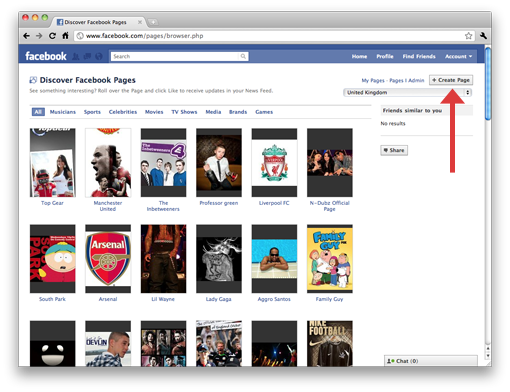
The first thing you’re going to want to do is log into the Facebook account you’re setting up the page with and head over to facebook/pages/ where you’ll click on a button which says “+ Create Page” (top right hand side of your screen):
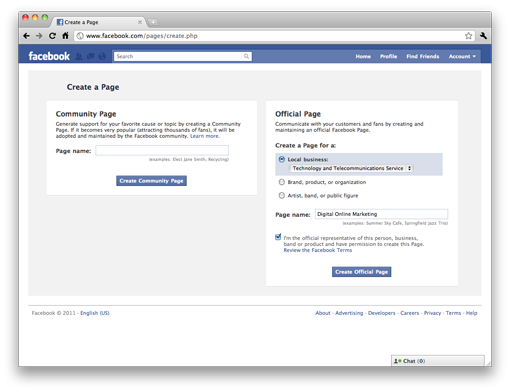
Once you’ve pressed this, you’ll be taken through to a form where you’ll want to fill in the details for an “Official Page”. We’re a Technology company, so we selected “Technology and Telecommunications Service” in the “Local business” dropdown, but there are a lot more options. Once you’ve selected the page type and filled in the page name which is available, click on “Create Official Page”:
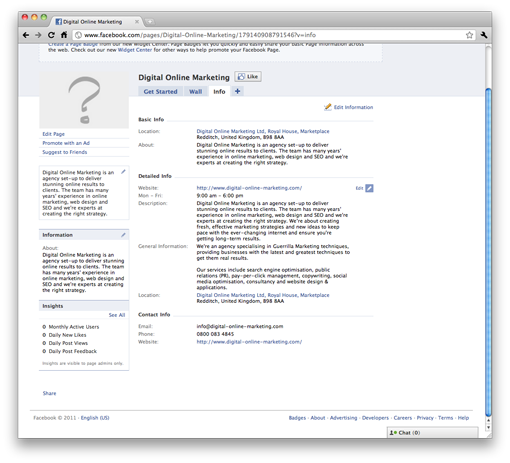
Ta-da! You now have your own Facebook Page, so your next step will be to add some company details (I always prefer to do this before the profile picture, as that seems like the icing on the cake). So, click on the “Info” tab and fill in all of your company’s details:
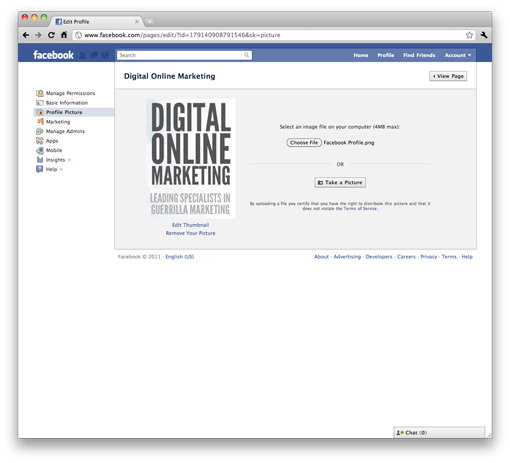
Finally, you need to add your profile picture. I always prefer to use portrait images, as it allows for more impact and to fit more information in. There have been some fantastic examples of individuals utilising the portrait layout to do full body shots, so try and be creative. To add your profile picture, hit “Edit Page” and then “Profile Picture” where you’ll be prompted to upload or take a picture. Make sure you’ve got the correct resolution, which is 198x* (* being whatever height you choose):
 Now you’re all set up! However, there may be some more things you can do…
Getting people interested
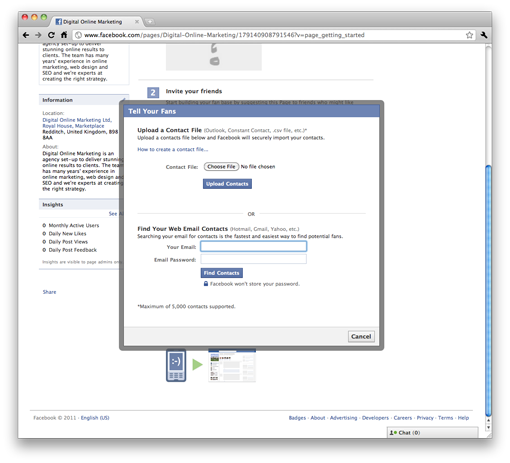
Before you have a strategy in place, the people who are most likely to “Like” your page are your stakeholders – be it people you’ve a business relationship with, existing clients, old clients, friends or family. Presumably you’ll have a database of your business contacts which you’ll be able to export as a spreadsheet, which you can easily upload by pressing “Tell Your Fans” on the “Getting Started” tab back on your Facebook Page. Once the popup has appeared you have two choices: Upload a Contact File or Find Your Web Contacts.
Uploading a Contact File is perfect if you have a spreadsheet of all your emails and should only take a few minutes. Once you’ve done this, you can also use your Gmail, Yahoo or Windows Live/Hotmail account to search for people on those mediums:
 Within a few hours, you should start getting a trickle of these fans when you can start implementing your chosen social media strategy.
What else you can do
Facebook Pages are amazing and they’re only getting better. You can add applications to your Pages just like your normal profile, so it’s possible to automatically send your tweets and blog posts to it without any hassle at all! We always recommend providing different users with unique content, but with that as a possibility you can easily schedule a tweet in HootSuite and a blog post in WordPress so there’s constant activity!
Finished?
 Your company has it’s own Facebook Page but you are by no means finished. If by creating this page you were expecting constant fans then I’m afraid you’re going to be disappointed. For a Facebook Page to work, it needs constant activity and it needs to be a place people want to visit. Throughout this year, we’re going to be posting blog posts about social media marketing, including specifics on Facebook Pages, Facebook Ads and more.